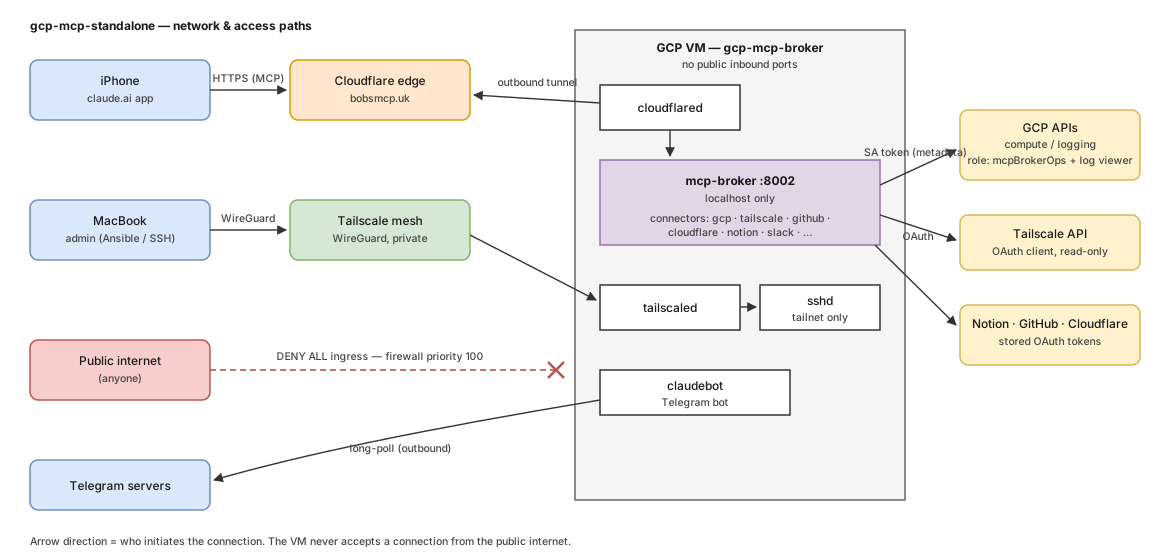
Key points
- GCP firewall
deny-public-ingress-mcp-broker(priority 100) denies ALL inbound traffic from the internet — including SSH port 22. Scanning the public IP answers nothing. - Public traffic (claude.ai →
bobsmcp.uk) arrives only via the Cloudflare Tunnel:cloudflaredon the VM dials OUT to Cloudflare's edge and pulls broker traffic back through that connection. The broker itself binds127.0.0.1:8002only. - Admin access ("SSH") exists solely inside the Tailscale mesh:
sshdlistens, but is reachable only over the WireGuard-encrypted tailnet interface. An attacker would first need to be a device on the tailnet. - Telegram bot:
claudebotlong-polls Telegram's API outbound — no inbound webhook. - Connector egress: the broker reaches GCP APIs with a metadata-server token capped
by custom role
mcpBrokerOps, the Tailscale API with a read-only OAuth client, and Notion/GitHub/Cloudflare with stored OAuth tokens (see gcp-mcp-standalone/connectors-gcp-tailscale). - Failure modes: if the VM hangs, both doors (tunnel + tailnet) die with it — recovery
is then
gcloud/Cloud Console from the Mac, or the GCP mobile app. The broker's owngcpconnector cannot rescue the VM it runs on.
Details
The diagram source is assets/diagrams/network-access.drawio.svg — a draw.io file
(openable/editable at diagrams.net or with the Obsidian draw.io plugin) that renders as a
plain SVG on the published site.
Related
Sources
Compiled from
wiki/projects/gcp-mcp-standalone/network-access.md · git is the source of truth